Digilent
DAQLog: Configuration and Data Logging Software for the LGR-5320 Series
DAQLog: Configuration and Data Logging Software for the LGR-5320 Series digunakan dalam aplikasi pemantauan data laboratorium, perekaman parameter fisik (tegangan, arus, suhu), dan integrasi sistem uji otomatisasi berbasis komputer.

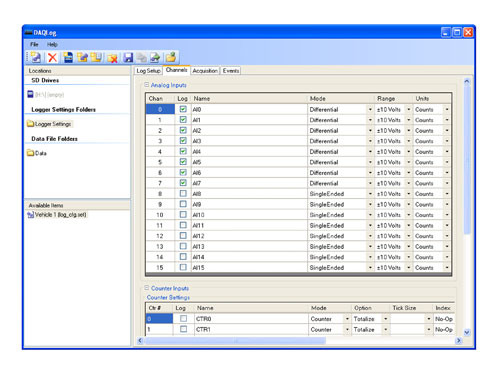
DAQLog is used to configure data acquisition (DAQ) settings for logging data with LGR-5320 Series devices. Device settings are saved and stored on a Secure Digital (SD) or Secure Digital High Capacity (SDHC) memory card. Settings files can be used with multiple devices as long as the device supports common features.
Create or edit a settings file (*.set), containing:
Logging session, device name, data storage options, and notes
Analog, digital, and counter input channel parameters
Acquisition count and trigger parameters
Event logging parameters
Deploy a settings file to SD memory card (included with MCC DAQ Logger hardware) or via logger device
Convert logged data files (*.dat)
Supported Operating Systems: Windows® 7/Vista®/XP SP2, 32-bit or 64-bit
View the LGR-5320
Quickly find what you need to get started and reduce mean time to measure.
Download DAQLogResource Center
Quick Links
DAQLog Quick Start Guide DAQLog Software User Manual DAQLog Example Programs
Aplikasi & Use Case: DAQLog: Configuration and Data Logging Software for the LGR-5320 Series digunakan dalam aplikasi pemantauan data laboratorium, perekaman parameter fisik (tegangan, arus, suhu), dan integrasi sistem uji otomatisasi berbasis komputer.
Butuh konsultasi teknis?
Kirim kebutuhan pengujian Anda — tim Terastek membantu menentukan konfigurasi yang sesuai.