Digilent
DASYLab: Icon-Based Data Acquisition, Graphics, Control, and Analysis Software
DASYLab: Icon-Based Data Acquisition, Graphics, Control, and Analysis Software mendukung kebutuhan integrasi sistem pengujian, aksesori pengukuran laboratorium, dan pemrosesan sinyal pada fasilitas riset dan industri.

Please visit measX to purchase DASYLab.
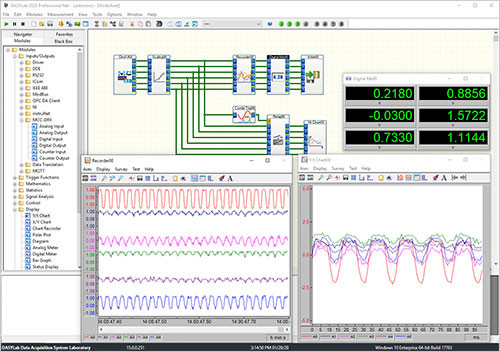
DASYLab data acquisition (DAQ) software provides tools and functions to quickly and easily develop complex applications without programming. The software offers real-time analysis, control, and graphics tools for creating custom graphical user interfaces (GUIs), supports most MCC devices, and also supports hardware from over 20 vendors.
Create complex applications quickly and easily without programming
Real-time data acquisition, analysis, control, and display functions
Standard real-time displays (charts, meters, graphs)
Complete library of computational functions including Statistics and FFT analysis
State Machine function for complex state-based scenarios
Script feature allows you to create custom functions using open source Python™
Connect to serial, OPC, ODBC, MODBUS, IVI, and TCP/IP based devices
Drivers for MCC, Data Translation®, IOtech®, National Instruments™, and other vendors
Combine analog, digital and counter inputs and outputs in one test
Simple creation of reusable code blocks with the Black Box module
More than 512 channels on multiple devices
Supported Operating Systems: Windows® 10/8.1/7
Download DASYLab 2022 Evaluation Copy
DASYLab LITE
Ideal for data logging and monitoring
Includes basic function modules for creating a worksheet
Supports 32 analog inputs and up to 64 worksheet wires
Supports one layout window for advanced user display management or reporting
DASYLab Basic
Supports unlimited worksheet wires
Supports up to 256 analog inputs and one layout window
Includes PID, Statistics, Formula, FFT, Filter and other analysis features
Includes control functions, Two-point Control, Switch, Slider, Coded Switch, as well as flexible triggers and comparison modules
DASYLab Full
DASYLab Full has been replaced with a 1-year license option
Includes all standard modules (a base selection of Signal Analysis modules, all Action and Action-enabled modules)
Supports up to 200 layout windows
Includes the powerful Control Sequencer module for controlling a series of test worksheets
DASYLab Pro
Includes the full set of modules – Control Sequencer, all signal analysis tools, the Sequence Generator, and all available add-on modules (without third-party modules)
Includes the suite of Network modules
DASYLab Runtime
Simplified user interface in which users can open a worksheet, load a sequence, operate a layout, and modify the window arrangement
Use Runtime mode for projects in which users can implement but not change the application
Which version is best for you?
DASYLab Version Comparison Chart
Quickly find what you need to get started and reduce mean time to measure.
Resource Center
Quick Links
DASYLab Supported ProductsDASYLab Quick Start GuideDASYLab DatasheetDASYLab User Manual
Aplikasi & Use Case: DASYLab: Icon-Based Data Acquisition, Graphics, Control, and Analysis Software mendukung kebutuhan integrasi sistem pengujian, aksesori pengukuran laboratorium, dan pemrosesan sinyal pada fasilitas riset dan industri.
Unduhan & Sumber
Butuh konsultasi teknis?
Kirim kebutuhan pengujian Anda — tim Terastek membantu menentukan konfigurasi yang sesuai.